
Catch Up with yourcolleagues

A cheaper Slack AI alternative for AI-powered message summaries so you never miss important messages.

Summarize in 3 steps

Summarize Slack in 3 steps: 1. Mention @Catch Up, 2. Wait while it reads the messages, 3. Get a summary based on messages and files

How to install and use Catch Up

About Catch Up - A cheaper Slack AI Alternative

Never miss important Slack messages or deadlines again with our AI-powered Slack catch up tool

Why I Built This Slack AI Alternative

As a student doing group projects, I faced a problem: information overload in Slack. Messages kept piling up, and we often missed:

  • Critical deadlines from our supervisors
  • Important project requirements
  • Key feedback that got buried in channels

Catch Up was born from this frustration. Catch Up enables you to create AI-powered summaries of your Slack workspace, highlighting important messages and ensuring nothing falls through the cracks. It's a Slack catch up tool for teams who want to stay informed without breaking the bank.

Why Choose Our Slack AI Alternative?

Slack AI

Per user

on paid Slack plans

  • AI-powered summaries
  • Requires payment for every user in your workspace
  • Quickly becomes expensive for teams
  • Limited customization options
Slack's Expensive Solution
AFFORDABLE ALTERNATIVE
Catch Up logo

Catch Up

$15

per workspace/month

  • AI-powered Slack summaries and catch up features
  • One price for your whole workspace
  • Highlights deadlines and critical information
  • Works on desktop and mobile
Try for free

Try our Slack AI alternative with a 30 days free trial!

Save time and never miss important information

Join teams who are using our Slack catch up tool to stay on top of their Slack communications for a fraction of the price of Slack AI.

Privacy First

Your data stays private and secure with OpenAI

Data Privacy

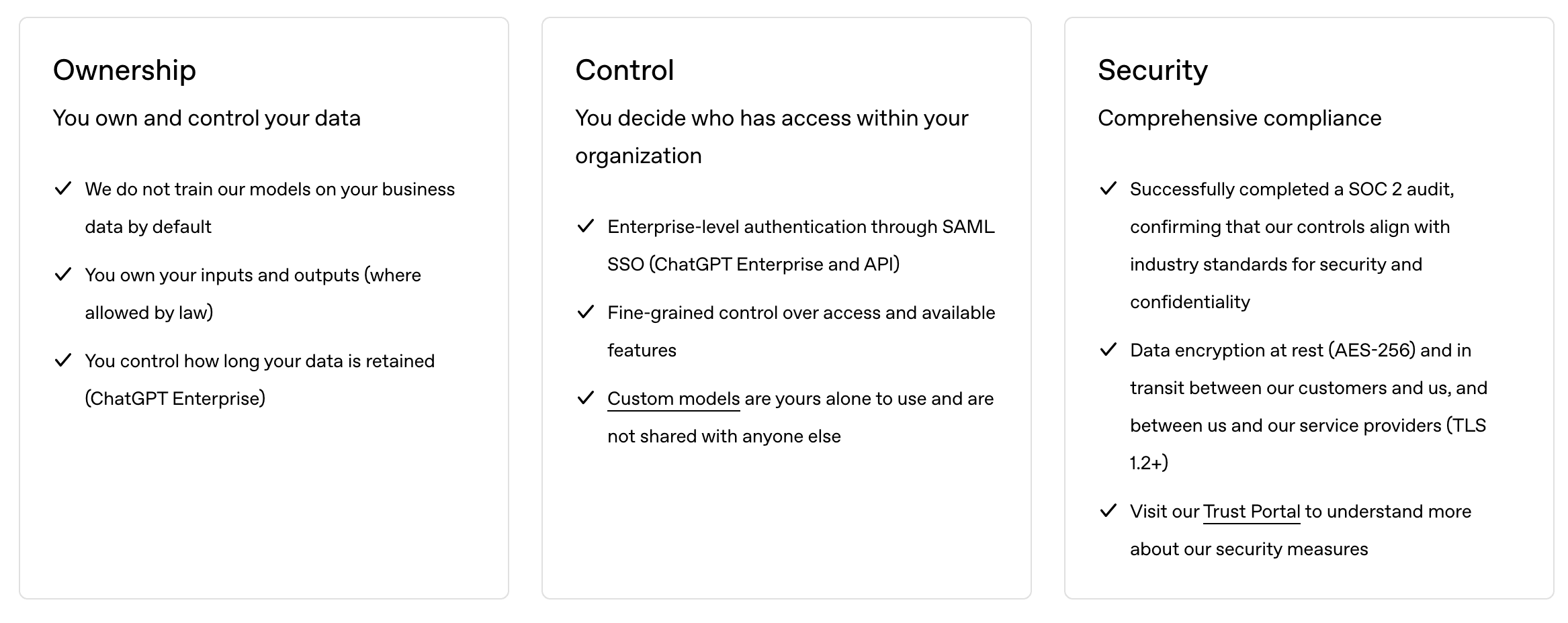
When using Catch Up, you can be confident that your data remains private. OpenAI has a strict policy regarding API calls:

  • No data retention from API calls
  • Data is not used for training models
  • Immediate data disposal after processing
OpenAI Privacy Policy

Source: OpenAI enterprise privacy policy

Learn more about OpenAI's privacy policy

How to Use Catch Up

Once installed, using Catch Up is simple. Just mention the bot with different commands to get summaries exactly when and where you need them.

Basic Commands

@catchup

Generate a summary using your default settings

@catchup help

Show help message with all commands

@catchup configure

Set up your personal preferences

@catchup status

View your current settings and remaining credits

Summary Commands

In a Channel

@catchup

Last day (only you can see it)

@catchup 3

Last 3 days (only you can see it)

@catchup public

Last day (everyone can see it)

@catchup 5 public

Last 5 days (everyone can see it)

In a DM with the Bot

@catchup

Your configured channels (default period)

@catchup 5

Your configured channels (last 5 days)

In a Thread

@catchup

Entire thread (only you can see it)

@catchup public

Entire thread (everyone can see it)

@catchup 5

Entire thread (days ignored)

@catchup 5 public

Entire thread (public, days ignored)

Custom Instructions

@catchup explain the technical decisions made

Use custom instructions for this summary

@catchup 3 focus on action items and deadlines

Combine days with custom instructions

@catchup public summarize the key outcomes

Use custom instructions with public summary

Tips

  • • Use public to make summaries visible to everyone in channels and threads
  • • Add custom instructions after the command to override your default settings for that summary
  • • Custom instructions help you get more targeted summaries (e.g., "focus on decisions", "explain technical points", "list action items")

Start summarizing your messages with AI using Catch Up.

Basic

$10.00

USD

  • Single channel summary
  • Multiple channels summary
  • Private conversation summary
  • Thread summary
  • User specific configuration
  • 16 summaries per month included
  • Customize with your own AI prompt
  • Summarize files from channel history

Try now with a 30 days free trial!

POPULAR

Pro

$15.00

USD

  • Single channel summary
  • Multiple channels summary
  • Private conversation summary
  • Thread summary
  • User specific configuration
  • 32 summaries per month included
  • Customize with your own AI prompt
  • Summarize files from channel history

Try now with a 30 days free trial!

Advanced

$25.00

USD

  • Single channel summary
  • Multiple channels summary
  • Private conversation summary
  • Thread summary
  • User specific configuration
  • 128 summaries per month included
  • Customize with your own AI prompt
  • Summarize files from channel history

Try now with a 30 days free trial!

Frequently Asked Questions

Here are some of the most frequently asked questions about Catch Up. If you have any other questions, feel free to reach out to us on this email.
Is Catch Up a good Slack AI alternative?
Yes! Catch Up is a Slack AI alternative offering AI-powered summarization features. Slack AI is billed per user, while Catch Up starts at $10 per workspace per month.
How does Catch Up compare to Slack AI?
Slack AI comes with paid Slack plans billed per user. Catch Up is billed per workspace, so the price stays the same as your team grows.
Can I use Catch Up as a Slack catch up tool on desktop?
Yes! Catch Up works as a Slack catch up tool on desktop, mobile, and all platforms where Slack is available. It integrates with your existing Slack workspace without requiring any additional software.
What makes Catch Up a good AI alternative to Slack AI?
Catch Up offers one price per workspace, file summarization (PDFs, images, CSV) on Pro and Advanced, and OpenAI-powered technology.
How is my data handled?
All your data remains securely within your Slack workspace. When generating summaries, we only temporarily process your data through OpenAI’s API, which has a strict no-data-retention policy. No information is stored by third parties. For complete details about how we protect your data, please visit our Privacy Policy or Privacy section.
How is it installed?
Install the Slack app Catch Up to your workspace, then use @catchup configure to set up your personal preferences. Watch installation video
How do I use the bot?
Simply mention @catchup in any channel, DM, or thread. Use @catchup help to see all available commands, or check out our How to Use section for detailed examples.
How do I customize the AI prompt?
Use the @catchup configure command to set up your personal preferences, including customizing the AI prompt to your liking.
How do I get a summary?
Use @catchup for default settings, or @catchup 3 to summarize the last 3 days. Works in channels (summarizes that channel), DMs (summarizes your configured channels), and threads (summarizes the entire thread).
What channels can I get a summary from?
You can get summaries from any public channel or direct message where Catch Up is invited. Configure your preferred channels using @catchup configure. Watch direct message example
How do I check my settings and credits?
Use @catchup status to view your current settings and remaining credits at any time.
Catch Up is not working, what do I do?
First, try using @catchup help to make sure you're using the correct commands. If issues persist, try reconfiguring with @catchup configure or contact support.
How do I add more summary credits?
This is not implemented yet, but it will be available soon.

Install Catch Up and start summarizing

Stop wasting time reading long messages and start summarizing them

Try for free